Blogs

Image
What is it?

What is it?

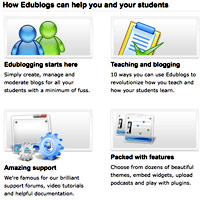
Blogs serve as a communication tools and discussion venues between teacher and parent, teacher and students, and students with students. Blogs encourage active involvement in sharing ideas and information and appeal to diverse kinds of learners. In the classroom, blogging is as valuable with directed assignments such as responses to document based questions (DBQs) as in ESL classes or informal conversations promoting writing skills.

Getting Started

A number of free blogging platforms are available that come with clear directions for setting up and using blogs. A few are listed below. Edublogs, powered by WordPress, offers free blogging sites to educators, directions for setting up, and tips for teaching with the blog. Managing Users is particularly pertinent for educators establishing a classroom blog. Instructions include important information about Creating Student Accounts Using One Gmail Address for students who do not have email. Free Edublogs are public; an advertisement-free, private blog with additional features is a subscriber option for about $4 a month. Gmail offers the free blogging platform, Blogger, which includes team blogging and privacy features. Blogger's own blog, Blogger Buzz, offers examples of Blogger-in-action and answers to technical questions and featured updates. WordPress is perhaps the most comprehensive online publishing tool. It is also more technologically challenging than Edublog and Blogger. An introduction to WordPress gives an outline of the possibilities of the system, and the site offers extensive question and answer sections and technical support, starting at WordPress for Beginners.

Blogging is about, first, reading. And it is about engaging with the content...reflecting, criticizing, questioning, reacting.
Examples

Teachers from elementary school through higher education are finding that blogging engages students in curriculum-centered conversations and that blogging encourages students who might otherwise be quiet to participate in discussions.  In the Classroom, Web Logs Are the New Bulletin Boards from the New York Times of August 19, 2004, demonstrates the use of blogs with second-graders in a Maryland school district. Teachers and administrators highlight why blogging is an effective classroom tool. Educational Blogging, by Stephen Downes, looks at blogging in an elementary school in Quebec, Canada. He discusses what blogs are and aren't; points to blog hosting sites; and explores the effect of blogs on teaching and learning. Stressing the value of blogs in fostering participation in communities of learners, he writes, "Blogging isn’t really about writing at all; that's just the end point of the process, the outcome that occurs more or less naturally if everything else has been done right. Blogging is about, first, reading. But more important, it is about reading what is of interest to you: your culture, your community, your ideas. And it is about engaging with the content and with the authors of what you have read—reflecting, criticizing, questioning, reacting." In Digital Discussion: Take Your Class to the Internet, author Helena Echlin explains, "For some, a blog is an electronic notebook—one students can't lose (or claim the dog ate). For others, it's a forum where a class discussion can unfold 24/7. Either way, blogging can be a powerful educational tool." She includes suggestions for setting up a classroom blog and a sample eighth grade lesson plan that leads students to identify characteristics of good blogging. Avoiding the 5 Most Common Mistakes in Using Blogs with Students, by Ruth Reynard on the blog Campus Technology, points to the importance of clarifying the role of the blog in the learning process: ". . . there must be concepts for students to think through, various resources and content segments to process, or ideas to construct." While the higher education community is the primary audience for this article, the concepts extend to all grade levels.
Social Explorer

Image
What is it?

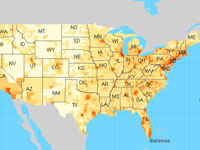
Social Explorer provides easy access to census demographics about the United States from 1940 to 2000. The free public edition offers a collection of interactive demographic maps of census data that can be viewed, queried, and manipulated. Students can visually analyze and understand the demography of the U.S., their regions, and their neighborhoods, creating their own queries and parameters.

Tools include zoom-in capability, selection of variables, the option to create a slideshow enabling comparative dataset mapping, and printing. City University of New York (CUNY) developed the project.

Getting Started

When you first access the site you will be offered a tour to get a feel of the tools offered and learn how to filter and display data.  Even after the tour is complete, should you need assistance you can always re-open it on the top navigation bar. 

Once the tour is complete, the default map will display population density in the United States.  In the upper left-hand corner there is the option to change data, state, and how the results are displayed (shaded vs. dot density).  Data is categorized into different themes which can be further narrowed down by year or by survey. Although the map only shows information for the United States, it does include Hawaii and Alaska and  different regions can be compared side by side using the gray bubble at the bottom.

Examples

The Social Explorer blog offers several helpful examples of how the site might be used.  This video explorers more about Social Explorer's tools and resources.  They also offer different categories in which user submitted reports and stories are featured.  Take a look at this story that explored racial demographics in the U.S. around the time of the 2018 royal wedding.  This data report also offers interesting and detailed data on citizenship.

PrimaryAccess

Image
What is it?

PrimaryAccess at the University of Virginia is a web-based tool for constructing short digital movies using text, images, and narration. The goal: to guide students in effectively using, interpreting, and integrating primary source materials.  

PrimaryAccess gives project control to teachers who select and annotate the resources their students might use to create historical narratives for a 1 to 3-minute movie, a feature perhaps particularly valuable for elementary school classes where extensive web browsing is neither authorized nor available. 
 

Getting Started

PrimaryAccess requires teachers to create a personal account and a class account in order to initiate a project. Producing the narrative then provides a strong active learning experience. While the how to narration is clear, educators will want to create a couple of movies themselves to help adapt instructions to their own classrooms. 

Producing the narrative then provides a strong active learning experience.

The student must research the topic, construct meaning from the selected primary documents, craft a written story that conveys that understanding to others, and finally, create a movie that uses the documents to accompany the narration in a visually compelling manner. Teachers can guide students to construct these narratives following a typical story structure, with a beginning, middle, and end.

Directions are both concise and detailed including a Teacher's Guide and How-to video. (No software downloads are necessary in order to use PrimaryAccess, nor is it necessary to download selected materials. PrimaryAccess links directly to online resources.)  To create the narrative of the movie, an external microphone connected to the audio input of the computer is requisite, although the narration may be recorded in other programs such as Audacity and saved as an MP3.
 

Examples

The site includes example videos, including digital stories on the Civil Rights Movement and Japanese Internment

The Smithsonian American Art Museum has also incorporated PrimaryAccess, especially for teachers, into the online exhibit 1934: A New Deal for Artists with the goal of helping students (and other visitors to the site) to assimilate and present content in the documentary movie style. Access user-created movies by following the map embedded in the Flash presentation, Picturing the 1930s.

Zotero

Image
What is it?

Zotero is a free, easy-to-use, open-source research tool that runs in the Firefox web browser and helps users gather, annotate, organize, cross-reference, and share the results of their research. At its most basic level, Zotero is a citation manager that expands for multiple tasks and uses. Specifically, Zotero let's you collect, organize, cite, sync, and collaborate online. Capture online research data from books, journal articles, websites and other resources with a single click on your location bar; take notes and otherwise annotate saved items, archive entire web pages; store related PDFs, files, images and links; organize and export data, and plot items on maps.

Getting Started

Zotero works with Firefox (3.0 and up) and Flock (2.0 and up) for Windows, Mac and Linux. The first step is to download and install Zotero. The online users guide gives complete instructions for installation, troubleshooting issues, and step-by-step guides to creating your own research library, organizing it, generating bibliographies and reports, syncing data, and getting the most out of the program. Screenshots and videos illustrate and clarify directions. Zotero's group feature enable's users to share their own work with others, to collaborate with colleagues (publicly or privately), and to discover and join in with other people working on similar interests. Groups represent a wide range of interests and in some instances advanced classes and students use Zotero groups for to share course materials— such as this Purdue University class, 680Archives, a group library for the Archives and Digital Humanities.

Zotero staff and the Zotero community of users and technical developers troubleshoot questions and glitches.

Zotero is a compact, accessible, and excellent resource for researchers—and an excellent platform for professional development, for educators to share materials and resources. In the K-12 arena, the software may be most useful for advanced high school students. Regular blog updates keep users on top of new developments and uses for Zotero. Zotero forums help users (and developers) navigate issues and maximize use of various features. The free Zotero account offers 100 MB of free storage. Additional cloud-based storage solutions for PDFs, images, web snapshots, and any other files attached to your Zotero personal and group libraries are available for nominal fees ($20 annually for 1G in June 2101.) storage solutions for heavy users allow you to access your Zotero-attached files from any computer with a web browser, and you can synchronize these files to any computer with Zotero installed.