YouTube: Crash Course

Annotation

The YouTube channel Crash Course was created and hosted by brothers John and Hank Green with the mission of making educational content accessible and free. Since its creation, the project has expanded significantly. Crash Course is funded through partnerships with organizations such as PBS and Arizona State University, grants from the Pew Charitable Trusts and the Arthur Vining Davis Foundations, and crowdfunding platforms like Patreon. This diverse funding model allows Crash Course to remain largely independent from outside influence while maintaining its commitment to accessible education.

While Crash Course videos cannot fully replace in-class instruction, they serve as an effective supplemental tool for teachers. The videos incorporate strong visual and auditory elements that help engage students and reinforce material covered in class. With playlists spanning a wide variety of subjects—not limited to history and civics—Crash Course offers short, student-focused content that can be easily integrated into existing lessons or used as introductions to new topics.

The U.S. History playlist consists of forty-nine videos and, while it cannot cover every possible topic in depth, it does address each major period of American history. These videos can serve as effective introductory resources for instructional units. The U.S. Government and Politics playlist provides a broader range of topics due to its more focused subject matter, covering areas such as the intended functions of government based on the founding documents, how government operates in practice, and how citizens can participate in the political process. Additionally, the channel offers separate playlists on the United States presidency and political theory, allowing for even broader coverage.

Crash Course also includes historical playlists focused on world history, European history, women’s history, Black American history, Native American history, and art history, offering greater depth and representation across disciplines.

Beyond serving as introductory material, Crash Course videos can be used by students to review content, study independently, or catch up after extended absences. Teachers may assign students to watch specific videos and take notes, allowing educators to track progress. While Crash Course is not ideal as the sole basis for a lesson or activity, it is an effective and versatile supplementary resource for both teachers and students.
Another Kind of American Idol

Date Published
Image
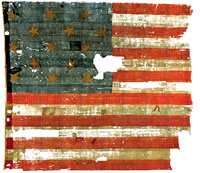
Smithsonian image, Star Spangled Banner
Article Body

The impressive Star-Spangled Banner, America's almost 200-year old, 34-by-34-foot flag that inspired Francis Scott Key to pen the national anthem, is a highlight exhibit at the Smithsonian Museum of American History.

But as important as the flag and the anthem are to our national identity, it's no secret that singing the anthem is not for the faint-of-voice or for the monotone, although it's publicly sung in every imaginable venue by choirs, opera singers, pop and rap performers, and many, many, many more. Now, the Smithsonian offers visitors to the online Star-Spangled Banner exhibit a chance to show the world how it ought to be sung on YouTube.

The Smithsonian invites you to

Sing the national anthem your way! Upload your video to our YouTube group and enter to win the Star-Spangled Banner singing contest sponsored by the National Museum of American History and USA WEEKEND. The Grand Prize winner will be invited to perform the national anthem at the Museum in Washington, DC and at the Baltimore Orioles vs. Atlanta Braves game, both on Flag Day (June 14, 2009). The prize includes a trip for two to Washington, DC, including airfare and two nights hotel accommodations; tickets and transportation to a Baltimore Orioles baseball game; and $400 in spending money.

Sample entries are posted; just hit the Go button and start singing!

The exhibit explores the Star-Spangled Banner as history, as artifact, and as symbol.

But first, tour other elements of this online exhibit. The Star-Spangled Banner site looks at the flag as history, as artifact, and as symbol. It weaves narratives of the past with present-day meaning. The exhibit tells the story of the flag and invites viewers to explore the physical features and dimensions of this carefully-preserved remnant. Close-up zooms focus on the fabric, weave, and color and explain history and conservation efforts over the years.

Mini-essays and quizzes give context to the War of 1812 and explain why the Star-Spangled Banner and subsequent versions of the flag came to hold such meaning for Americans. Read the history of the American flag, and investigate rules and rituals surrounding its display and use.

The interactive feature, Share Your Story, encourages individuals to talk about the meaning of the flag in their own lives and to upload photographs illustrating that meaning.

Bookmark This! History Sites on YouTube

Date Published
Image
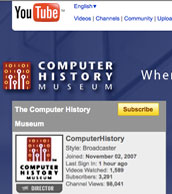
screenshot, YouTube computer museum
Article Body

Numerous museums have launched channels on YouTube. The result? Videos of lectures, oral histories, exhibits, and digital archives with accompanying commentary and analysis are available with the click of a mouse. One avenue to find them is simply to use the search term museum and select the Channels option.

Art repositories—always amazing sources for visual and material cultures for the history classroom—outnumber history museums, but you'll find the following:

The Newseum, located in Washington, DC, has posted 69 videos, including a series of brief clips (30 seconds to two minutes) on how journalists reported the assassination of Abraham Lincoln.

The Computer History Museum channel focuses on the communications revolution and the role of the computer. Videos include talks by legal historian Lawrence Lessig and other prominent scholars; videos from the American Academy of Arts and Sciences March 2009 Symposium on the Impact of Information Technology on Society: Technology and the Future of the Book; and historic views of computers through time.

The Library of Congress channel includes historic films, lectures, and public talks. The channel includes historic film clips, some only a few seconds long, demonstrating early filmography—others, such as a 14-minute mini-documentary on Rosie the Riveter, highlight collections with commentary from curators and archivists. Bibliographic and explanatory materials accompany each item. According to the Library Blog, playlists will continue to grow, just as the Library has continued to expand its Flickr pilot project during the past several months in order to make resources and collections increasingly accessible to the public.

The United States Holocaust Memorial Museum channel broadcasts oral histories of Holocaust survivors and numerous historic and documentary films with commentary.

KeepVid

Image
Question

My district blocks ALL access to online video. What is the best method to save online clips (at home) in order to show them in the class?

Answer

There are several different options available for teachers who would like to download and save online clips. Perhaps the easiest is to use a free service such as KeepVid.

Using KeepVid is a simple process. First, find the video clip that you wish to download. This might be at YouTube or another video sharing site such as DailyMotion or Vimeo. Copy the URL of your video clip and paste it into the Search box at KeepVid.

KeepVid will then give you several file format types to download. Selecting the file you want (usually the MP4 version) and it will start the process of downloading the file to your computer. Once the download is complete, it can be played with whatever video player you prefer to use.

KeepVid allows you to search for videos rather than the copy and paste method. Simply type in keywords such as "Battle of Gettysburg" and KeepVid will search YouTube for you and provide a list of results. Selecting a video from the list will start the same process described above.

KeepVid also has a bookmarklet that can be dragged onto the taskbar of your browser. The bookmarklet acts as a shortcut—you can skip the copy and paste process completely. For example, simply go to YouTube, find your clip, and click the installed bookmarklet. KeepVid does the rest.

While teachers and students do have more freedom under the Fair Use clause of the Copyright Act, it’s always a good idea when using online video clips to think about intellectual property. The traditional view of copyright is adapting to the new world of online media, so I have included links to a variety of resources on copyright below.

For more information

Read up on copyright in "When Copyright Meets the Classroom" and "Beyond Google Searching," two Ask a Digital Historian answers.

Or try American University's "Code of Best Practices in Fair Use for Media Literacy Education," or Education World's five-part "The Educator’s Guide to Copyright and Fair Use."